Introduction
In today’s AI-driven world, email privacy is no longer optional - but security alone isn’t enough. Most users also want faster, smarter ways to manage their inbox without giving up control over their data. When comparing Canary Mail vs Proton Mail, the key difference is whether you prefer a privacy-focused email provider or a secure, AI-powered email client like Canary Mail that works with the accounts you already use.
Who this comparison is for:
- Mac and iPhone users deciding between a secure email provider and a secure email client
- Users comparing Proton Mail’s built-in encrypted service with a more flexible PGP email client that supports Gmail, iCloud, and other IMAP accounts
- Professionals and privacy-conscious users looking for a secure email app for Mac or encrypted email for iPhone with modern productivity features
- Anyone exploring a Proton Mail alternative that combines strong encryption with a private AI email assistant to streamline everyday email tasks
In simple terms, Proton Mail is an email provider, meaning you adopt a Proton address and ecosystem. Requires Proton Mail Bridge on desktop. Canary Mail is a secure email client, letting you keep Gmail, Outlook, iCloud, or IMAP accounts while adding AI productivity and PGP encryption on top.
[cta-block:ctablock1,title="Try Canary Mail - the secure inbox built for focus",button="Get Canary Mail",buttonlink="https://canarymail.io/downloads"]
Canary Mail vs Proton Mail: Quick Verdict
Both Canary Mail and Proton Mail offer strong email security, but they serve different needs. If your priority is default encrypted email inside a privacy-first provider ecosystem, Proton Mail is a strong choice. If you want to keep your existing email provider and add AI productivity plus optional PGP encryption across multiple accounts, Canary Mail stands out as the more flexible option.
Choose Proton Mail if you want:
- A privacy-first encrypted email service with end-to-end encryption by default
- An email service designed around privacy and security
- A simple, controlled workflow within the Proton ecosystem
Choose Canary Mail if you want:
- A private AI email assistant for faster, smarter inbox management
- A flexible PGP email client across Gmail, Outlook, iCloud, and more
- A secure email app for Mac and encrypted email for iPhone that fits your existing workflow
Canary Mail vs Proton Mail: Key Differences
While both Canary Mail and Proton Mail focus on secure email, they are built around different approaches to privacy and productivity. The table below highlights the core differences to help you quickly understand which option better fits your workflow.
| Feature | ProtonMail | Canary Mail |
|---|---|---|
| What it is | An encrypted email service with its own email platform | A secure email client for existing accounts |
| Encryption approach | End-to-end encryption by default for Proton-to-Proton, plus options for PGP/password-protected messages externally. | PGP available across your existing providers when you enable it. |
| AI features | Proton Scribe writing assistant (plan dependent), privacy-first approach. | AI drafting + summaries inside the client, with multi-account workflows |
| Multi-account support | Limited to Proton accounts | Unified inbox for multiple providers like Gmail, Outlook, and iCloud |
| Best for | Users focused primarily on privacy-first email communication | Users looking for privacy plus productivity with a private AI email assistant |
Proton Mail Privacy and Encryption Strengths
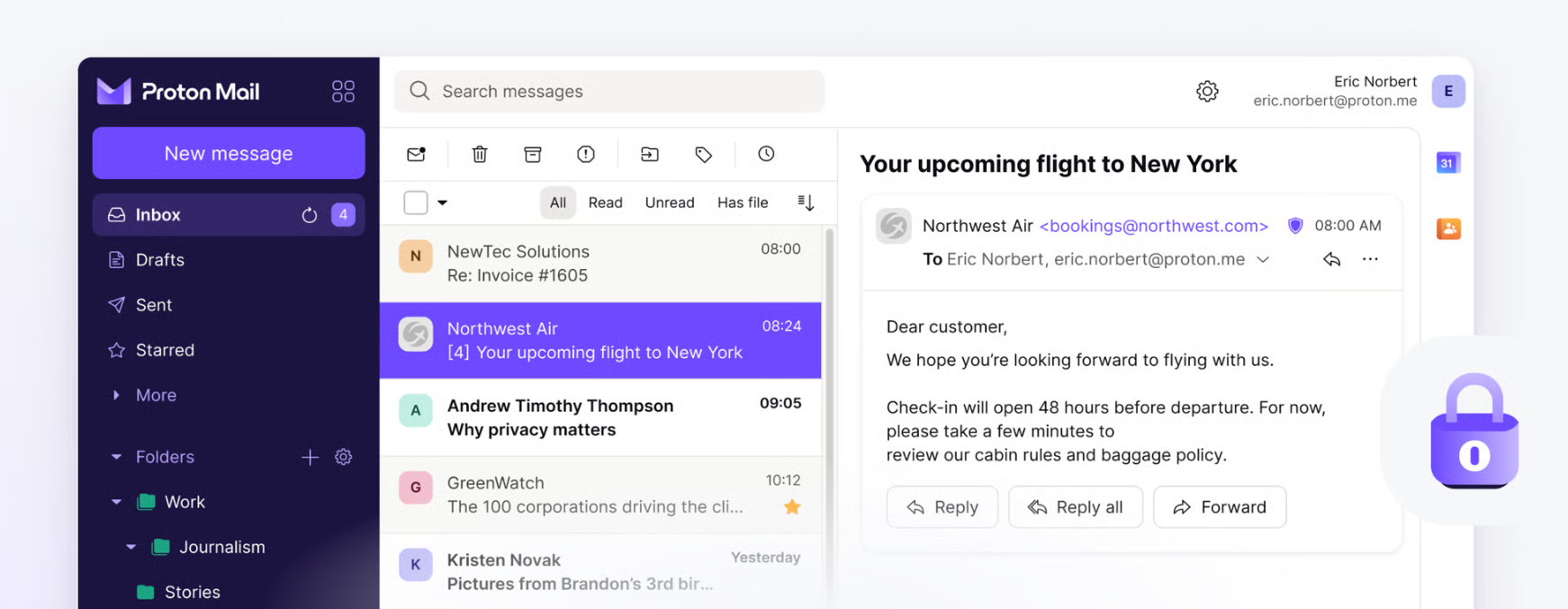
Proton Mail is often seen as the default option for secure email, especially for users who want encryption handled automatically within a single service. Its approach centers on built-in privacy features that work best when staying inside the Proton ecosystem. If Tutanota is also on your list, read Canary Mail vs Tutanota.
- Provides end-to-end encrypted email by default between Proton Mail users
- Designed as an all-in-one encrypted email service with security enabled automatically
- Well suited for users who prefer a privacy-first email experience with minimal configuration
- May involve ecosystem trade-offs for Mac users who rely on external email clients
- Requires Proton Mail Bridge on desktop to connect via IMAP.
Proton Mail’s end-to-end encryption works most seamlessly for Proton-to-Proton communication, while external messages may rely on PGP keys or password-protected emails.
Canary Mail Privacy and Encryption for Everyday Email
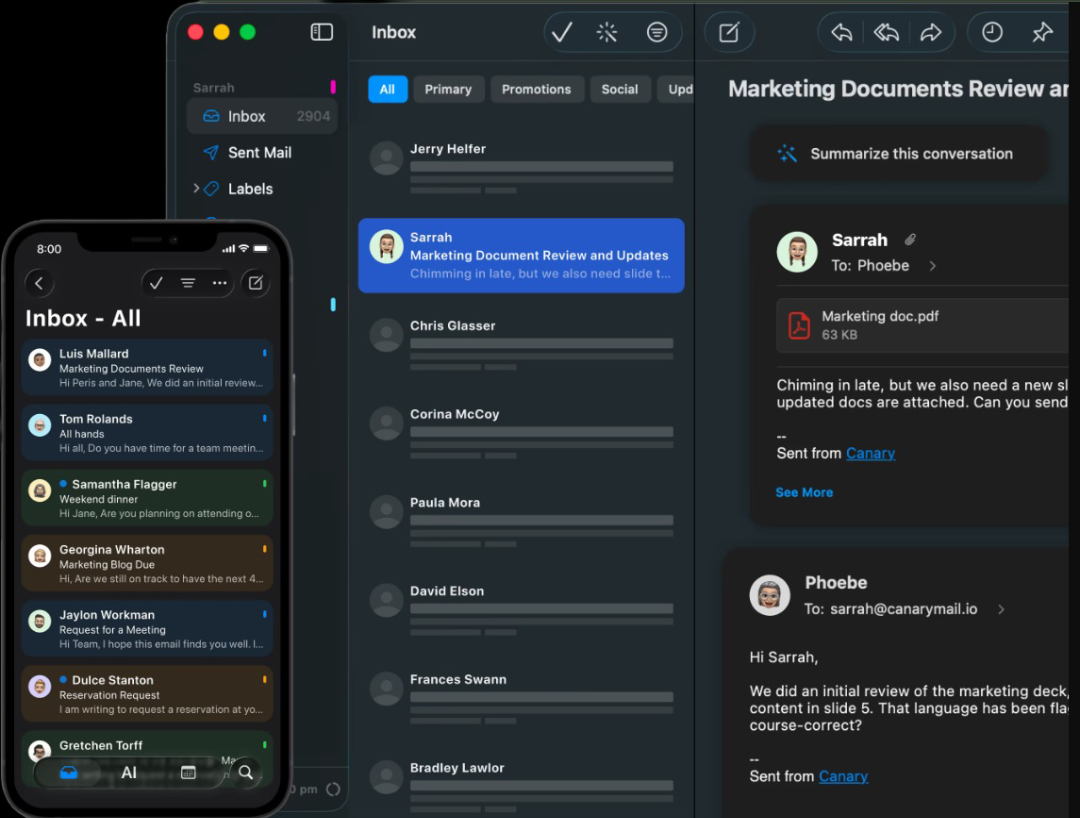
Canary Mail focuses on delivering strong privacy while letting users keep the email providers they already use. Instead of replacing your inbox, it adds encryption and security controls to everyday email workflows across multiple accounts.
- Uses PGP encryption that you can enable when needed, explained in simple terms
- Works with Gmail, Outlook, iCloud, and other providers, supporting privacy without switching
- Helps Mac and iPhone users add stronger security to existing inboxes
- Includes protections such as phishing detection and tracker blocking, supporting safer email use
- Combines privacy with productivity through built-in AI email features and broader email security features
Canary Mail vs Proton Mail: AI Features and Privacy Questions
AI is becoming an important part of modern email, offering productivity benefits while raising privacy considerations. When comparing Canary Mail vs Proton Mail, the key difference is not just whether AI exists, but how it fits into each product’s approach to security and user control.
- Proton Mail: Proton Mail focuses on provider-level privacy and encrypted email workflows. It also offers an AI writing assistant called Proton Scribe, which Proton states runs locally and is not used to train AI models. The emphasis remains on privacy-first communication within the Proton ecosystem.
- Canary Mail: Canary Mail treats AI as a productivity layer, designed to help users draft replies, summarize messages, and manage email more efficiently. The decision to use AI features depends on individual privacy expectations, especially for users who want a private AI email assistant alongside strong encryption and control. Canary Mail states its AI features are powered by OpenAI and that user data is not used to train AI models, aligning productivity benefits with privacy-first principles.
Questions to Ask Any AI Email App
Before enabling AI features in any email client, consider these key questions:
- Does AI process message content, and if so, how is it handled?
- Can you control what data is used or excluded from AI features?
- Is any message data stored, and for how long?
- What processing happens on-device versus in the cloud?
Asking these questions helps users balance convenience and privacy when evaluating AI-powered email tools, especially when comparing Canary Mail vs Proton Mail.
[cta-block:ctablock2,title="Boost your productivity with AI and privacy-first email",button1="Download for Mac",button1link="https://canarymail.io/downloads",button2="Get it on iOS",button2link="https://canarymail.io/downloads"]
Canary Mail vs Proton Mail: Multi-Account Workflow
Managing multiple email accounts can feel overwhelming, especially for professionals balancing personal and work messages. When comparing Canary Mail vs Proton Mail, the way each handles multi-account workflows can impact productivity and daily email management.
- Unified inbox for multiple providers: See Gmail, Outlook, iCloud, and other IMAP accounts in one place
- Personal and work separation: Canary Mail keeps all your accounts in one app while letting you maintain clear boundaries between personal and professional email. This helps you prioritize messages without losing context.
- Faster triage and streamlined workflows: Predictive search, AI-driven smart filters, and unified notifications make it quicker to sort, respond to, and organize emails across multiple accounts.
Proton Mail, on the other hand, focuses on its own secure ecosystem. Users with multiple accounts may need to manage them separately. Some setups rely on bridge-type workflows, which can add extra steps for triage and switching between accounts.
Canary Mail vs Proton Mail on Mac and iPhone
For Apple users, Mac and iPhone experiences are key. Canary Mail vs Proton Mail offers different workflows and usability.
- Mac Experience: Canary Mail offers a native Mac interface designed for multi-account workflows. It supports offline reading and drafting depending on device and account sync settings. Proton Mail is primarily accessed through its web app on Mac, and some users rely on Proton Bridge for client-based workflows, which can add setup complexity.
- iPhone Experience: Canary Mail provides a streamlined iOS experience across multiple email accounts in one app. Proton Mail delivers strong encryption on iPhone, but the experience is most seamless when using Proton accounts within its ecosystem.
- Offline Access: Canary Mail supports offline access for reading and drafting emails based on local device synchronization. Proton Mail’s offline capabilities depend on its web app or ecosystem setup, and some users use Bridge when working with desktop email clients.
- Setup and Switching: Canary Mail makes moving Gmail, Outlook, or iCloud accounts easy. Proton Mail requires a new Proton address on desktop. Requires Proton Mail Bridge on desktop to connect via IMAP.
For Mac and iPhone users seeking a secure email app for Mac or encrypted email for iPhone, Canary Mail is a flexible, privacy-focused option that combines AI productivity with strong encryption.
Canary Mail vs Proton Mail Pricing
Both Canary Mail and Proton Mail offer free and paid tiers, making it easy to get started. The choice depends less on cost and more on how you work with email every day.
- Proton Mail: A privacy-first email provider with built-in end-to-end encryption. Best for users who want a secure ecosystem and simple, privacy-focused workflows. Learn more on Proton’s pricing page.
- Canary Mail: Combines security with productivity. Supports multiple accounts, AI-assisted email tools, and PGP encryption. A practical Proton Mail alternative for Mac and iPhone users managing Gmail, Outlook, or iCloud in one app. Learn more on Canary’s pricing page
If you value AI productivity, multi-account workflows, and flexible privacy, Canary Mail may better fit your daily email routine. If strict ecosystem-based encryption is your priority, Proton Mail remains a solid choice.
Canary Mail vs Proton Mail: Best for Different Users
Choosing between Canary Mail vs Proton Mail depends on your workflow and privacy needs:
- Journalists & activists: Proton Mail is perfect for a privacy-first email provider with default end-to-end encryption.
- Founders & operators: Canary Mail’s AI tools and multi-account workflow help manage high volumes of email efficiently.
- Recruiters & freelancers: Canary Mail separates personal and work accounts and speeds up replies with AI email features.
- Mac power users: Canary Mail offers a native Mac interface with advanced search and supports offline reading and drafting depending on device and account sync settings.
- Users who want encryption but can’t switch providers: Canary Mail adds PGP encryption to Gmail, Outlook, iCloud, and more, acting as a flexible Proton Mail alternative.
This approach makes it easier to pick the right tool based on whether you value privacy, productivity, or multi-account flexibility. If FairEmail is on your shortlist too, our guide to the best email apps for Android covers it.
Canary Mail vs Proton Mail: Conclusion
Both Canary Mail and Proton Mail offer strong security, but they serve different needs. Proton Mail is ideal for users seeking a privacy-first email provider within a secure ecosystem. Canary Mail is a flexible Proton Mail alternative that adds AI productivity, multi-account support, and PGP encryption while letting you keep Gmail, Outlook, or iCloud. Choose the tool that best fits your workflow, whether your priority is maximum privacy, smarter email management, or seamless multi-account access.
[cta-block:ctablock3,title="Upgrade to a smarter, safer inbox today",subtitle="Experience the power of AI Copilot and encrypted privacy with Canary Mail.",button1="Download Now",button1link="https://canarymail.io/downloads",button2="Explore Features",button2link="https://canarymail.io/features"]
Canary Mail vs Proton Mail FAQs
Is Proton Mail more private than Canary Mail?
Proton Mail is a privacy-first email provider with built-in end-to-end encryption. Canary Mail also encrypts emails with PGP but adds AI and multi-account features.
Can Canary Mail replace Proton Mail?
Yes. Canary Mail is a flexible Proton Mail alternative for users who want encryption plus AI productivity across multiple accounts.
Does Canary Mail support PGP encryption?
Yes. Canary Mail supports PGP encryption for secure emails on Gmail, Outlook, iCloud, and more.
Does Proton Mail have an AI email assistant?
Yes. Proton Mail includes an AI writing assistant called Proton Scribe, which Proton says runs locally and is not used to train AI models. Its focus remains on privacy-first communication within the Proton ecosystem.
Which is better for Mac and iPhone users?
Canary Mail offers native Mac and iPhone support, AI tools, and supports offline reading and drafting depending on device and account sync settings. Proton Mail works best within its own ecosystem.