How you open an encrypted email depends on who encrypted it. Most encrypted messages people receive come from Microsoft 365. If you use Outlook with a Microsoft 365 or Outlook.com account, it usually opens like any other message. In Gmail, Yahoo or another inbox, select Read the message, then sign in with your Google, Yahoo or Microsoft account, or ask for a one-time passcode by email (it expires after 15 minutes). A Gmail confidential email asks you to select View the email and enter a passcode. S/MIME messages need your certificate installed, and PGP messages need your private key in an app that supports PGP.
The sections below show how to tell which type you have, the steps for each one, and what to do when the message still won't open. For the bigger picture of how these systems differ, see our guide to email security.
What kind of encrypted email did you get?
Look at what arrived in your inbox. The wording and the attachment name usually tell you which system the sender used.
| What you see | What it is | What you need to open it |
|---|---|---|
| "Read the message" button, or a message.html attachment | Microsoft Purview Message Encryption (Microsoft 365) | A Microsoft, Google or Yahoo sign-in, or a one-time passcode sent to you |
| Banner about restricted permissions in Outlook | Microsoft 365 encryption opened natively | Nothing extra in a supported Outlook app |
| "View the email" link, sender used Gmail | Gmail confidential mode | A passcode sent by text or email |
| Lock icon and "can't open this item" without a certificate | S/MIME | Your own S/MIME certificate and private key |
| Text starting with -----BEGIN PGP MESSAGE-----, or an encrypted.asc attachment | PGP / OpenPGP | Your PGP private key and passphrase |
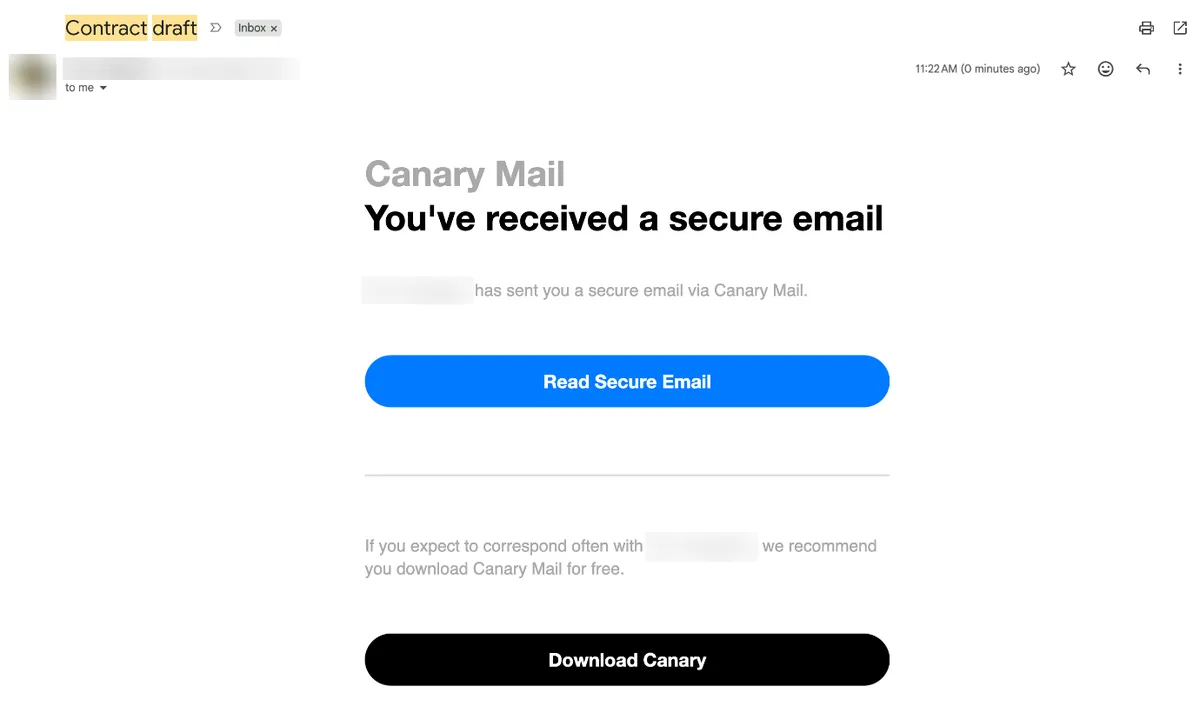
| "Read Secure Email" button | Canary Mail SecureSend | Sign in to your email account, or a magic link |
| "Unlock Message", "Click here to read" or a branded portal | Virtru, Proofpoint or another encryption service | A verification email, sign-in or portal password |
Before you click anything, make sure the message is real. Fake "secure message" notices are a common phishing trick. There's a short checklist near the end of this guide.
Open a Microsoft 365 encrypted email
Microsoft Purview Message Encryption (formerly Office 365 Message Encryption) is what you get when someone clicks Encrypt in Outlook at work or uses a Microsoft 365 Personal or Family plan. It's what most bank, school and government "encrypted message" emails use. What you do depends on the account the message went to. (If you're the one sending, see how to encrypt email in Outlook.)
In Outlook with a Microsoft 365 or Outlook.com account
Usually there's nothing to do. The message arrives like any other, and Outlook shows an alert about restricted permissions near the header. If it doesn't display in the Reading pane, open it in its own window.
- Encrypt-only messages open directly in new Outlook for Windows, Outlook on the web, Outlook for iOS and Android, and Outlook for Windows 2019 and later (including Outlook for Microsoft 365).
- Do Not Forward and other protected messages open in any current version of Outlook for Windows, Outlook for Mac, Outlook on the web and Outlook.com when you're signed in with a work or school account.
- Outlook.com, Hotmail and Live addresses read encrypted messages the same way as normal ones on Outlook.com, in the Outlook mobile app and in new Outlook.
To reply, choose Reply or Reply All and send as usual. Outlook sends you an encrypted copy of your reply. If the sender applied a Do Not Reply policy, you can't reply at all.
In Gmail, Yahoo, Apple Mail or any other inbox
If the message went to an address outside Microsoft 365, you get a wrapper email with a link (and often a message.html attachment) instead of the message itself.
- Open the email and select Read the message. If there's only an attachment, open message.html. It loads the same page in your browser.
- Pick a sign-in method. For a Gmail, Yahoo or Microsoft address, select Sign in with Google, Sign in with Yahoo or Sign in with Microsoft. Use the account the message was sent to.
- Or select Sign in with a one-time passcode. Microsoft emails a code to the same address that got the encrypted message.
- Go back to your inbox, copy the passcode, enter it on the web page and select Continue. The code expires after 15 minutes. If it does, open the original email again and request a new one.
The message opens in Microsoft's encrypted message portal in your browser. You can read it, preview or download attachments, and reply from there. You don't need to install anything. The sender's organization decides which sign-in options appear, so you might see only the passcode option, or no passcode option at all.
On iPhone or Android
The Outlook app for iOS and Android opens Microsoft 365 encrypted messages for Microsoft 365 and Outlook.com accounts. In the iPhone Mail app or the Gmail app, tap Read the message and follow the browser steps above. If you go with the passcode, switch back to your mail app to get it, then return to the browser tab and type it in.
Open a Gmail confidential mode email
Gmail's confidential mode is closer to access control than encryption. The sender sets an expiry date and can require a passcode, so to you it behaves like a locked message.
If you use Gmail (on the web or in the Gmail app):
- Open the email. If the sender didn't require a passcode, it opens right away.
- If it asks for one, select Send passcode and check your phone for a text.
- Enter the passcode and select Submit.
If you use another email service:
- Open the email and select View the email.
- Select Send passcode. The code arrives by text or email.
- Enter it and select Submit.
You can't forward, copy, print or download a confidential email. Access ends on the expiry date, or earlier if the sender removes it. If the message won't open, ask the sender to resend it or give you more time.
Some Google Workspace businesses use Gmail's end-to-end encryption instead. If you're outside Gmail, you'll get a notification and read the message in a restricted version of Gmail through a guest account. The steps on that page walk you through it. For the sender's side of all this, see our guide to sending encrypted email in Gmail.
Open an S/MIME encrypted email
S/MIME is certificate-based encryption, mostly used by companies, universities, government and the military. A message is encrypted to your certificate, so only the matching private key can open it. There's no link or passcode to fall back on. If you don't have a certificate, you can't read it and need to ask the sender to use another method.
If you do have one (usually from your IT department, on a smart card or as a .pfx or .p12 file), install it where you read mail:
- Classic Outlook for Windows: Outlook decrypts the message when you open it, as long as the certificate is on your computer. It may ask you to allow access to the keystore. With a smart card, insert it and enter your PIN when asked. To choose the certificate, go to File > Options > Trust Center > Trust Center Settings > Email Security, then Settings under Encrypted email.
- New Outlook for Windows: it doesn't install certificates automatically. Go to Settings > Mail > S/MIME and select Import, or ask your admin to deploy it.
- Outlook on the web: install the S/MIME control from Settings > Mail > S/MIME. In Edge or Chrome it's a browser extension, and Chrome also needs a computer joined to your organization's domain.
- iPhone and iPad Mail: install your S/MIME certificate for the account. Your organization can provide one for Exchange accounts.
In every Outlook version, conversation view doesn't support encrypted messages. Open the message in a new window.
Open a PGP encrypted email
A PGP message (also called OpenPGP) shows up as a block of scrambled text that starts with -----BEGIN PGP MESSAGE-----, or as a near-empty email with an attachment such as encrypted.asc. It was encrypted with your public key, so you need the matching private key, and usually its passphrase. Nobody else can decrypt it for you, the sender included. If you've lost the private key, the message can't be recovered. Ask the sender to send it again to a new key.
If you've never made a PGP key, the sender probably expected you to have one. Reply (unencrypted, nothing sensitive) and ask them to use a secure message link instead, or set up PGP and send them your public key. Our explainer on how PGP encryption works covers keys from scratch.
In an email app that supports PGP
The least fiddly route is an email app that decrypts PGP in the inbox, so the message just opens. Canary Mail does this for Gmail, Outlook, iCloud and most IMAP accounts on Mac, Windows, iPhone, iPad and Android. Disclosure: we make Canary Mail. PGP is part of the Pro+ plan ($100 a year, with a 7-day free trial).
- Export your private key from the tool where you made it (for example GPG Keychain, with the option to include secret keys) as an .asc file.
- On a Mac, open Canary Mail > Settings > Security, turn on manual PGP mode, then open Keys.
- Click Import, choose the .asc file, and link the key to the mail account it belongs to.
- On iPhone or iPad, go to Settings > Security > PGP Keys and import the key from the Files app.
In manual mode, Canary keeps your keys on the device, encrypted, and never uploads them. Once the key is linked, encrypted messages to that address show up already decrypted when you open them. The downside: the security features need the paid Pro+ plan, and there's no monthly billing (it's yearly or a one-time lifetime purchase).
Other apps work too. Thunderbird has had OpenPGP built in since version 78, on Windows, Mac and Linux. For PGP on Apple Mail and other iPhone apps, see our roundup of PGP apps for iPhone and iPad.
With a desktop PGP tool
If your mail app can't do PGP, copy the encrypted block (or save the .asc attachment) and decrypt it in GnuPG, Kleopatra on Windows or GPG Keychain on a Mac. On the command line, gpg --decrypt message.asc prints the message after you enter your passphrase. It works, but you have to repeat it for every message, and replying securely means encrypting by hand too.
Open a Canary SecureSend email
SecureSend is how Canary Mail users send a protected message to someone who doesn't use PGP. You don't need Canary or a new account to read one.
- Open the notification email and select Read Secure Email.
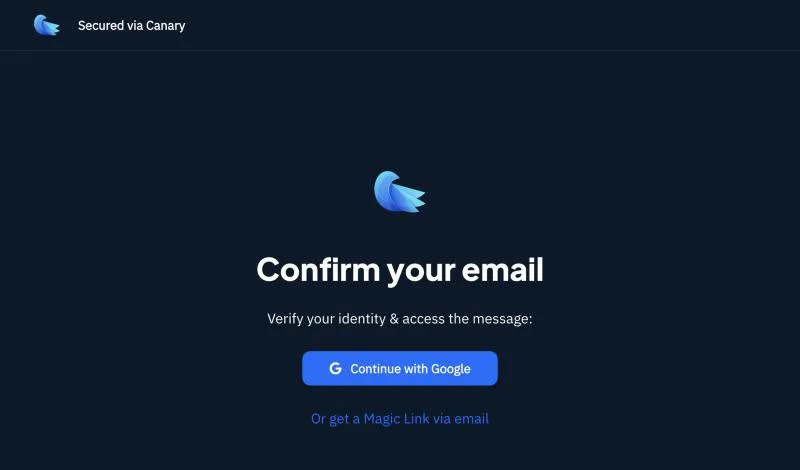
- Prove it's your address. Either sign in to your email account, or request a Magic Link, which goes to the same address and needs no sign-in.
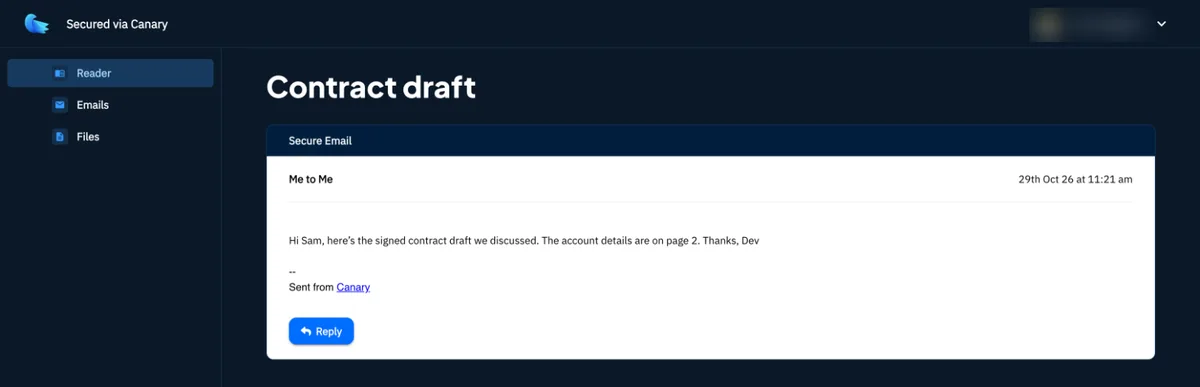
- Read the message in the secure reader. You can download attachments and, if the sender allowed it, reply securely with Secure Send.
The sender can set an expiry date or revoke access at any time. After that the link stops working and the reader says the message is unavailable, so ask them to send it again. If you already use Canary Mail, SecureSend messages open in the app with no extra steps.
Open a secure-portal email from Virtru, Proofpoint and others
Many banks, law firms and healthcare providers use a dedicated encryption service. The screens look different, but the pattern is the same: click the button in the email, then prove you own the address.
- Virtru: select Unlock Message, choose the exact address the message was sent to, then sign in or pick one-time verification. Open the verification email and select View Message in the same browser on the same device. Verification links are single-use and expire after 24 hours.
- Proofpoint Encryption: the first time, the portal asks you to register with your name and a password. After that you sign in with that password. Use Forgot Password on the portal if you lose it. Messages can expire. USC's setup, for example, removes them after one month.
- Anything else: look for the sender's own help link in the notification. The exact steps depend on how the sender's organization set the service up, so their IT or support team is the right contact.
Why can't I open an encrypted email?
The one-time passcode never arrives
- Check Junk, Spam, Promotions and Other. Microsoft says passcode emails often get filtered.
- Wait a minute or two, then request a new code. Each code lasts 15 minutes, so use the most recent one.
- The code goes to the address the encrypted message was sent to, not your main address. If the message came to an alias or forwarding address, look there.
- Still nothing? Ask the sender to have their IT team check quarantine. Microsoft notes that passcode emails, especially the first ones an organization sends, often land there.
It keeps asking you to sign in, or says you're the wrong user
You're probably signed in to a different Microsoft or Google account in the same browser. Open the link in a private or incognito window and sign in with the address the message went to. If sign-in with a personal Microsoft account is blocked, pick the one-time passcode instead.
"We can't display your message right now"
Microsoft documents this Outlook on the web error for Microsoft 365 users. The cause is a setting in the organization's Outlook on the web policy, so only an admin can fix it. Until then, try the message in the Outlook desktop or mobile app.
Outlook shows a message.rpmsg attachment or won't open it
- Open the message in a new window. Encrypted messages don't open in conversation view.
- Make sure you're signed in to Outlook with the account the message was sent to.
- Older Outlook versions can't read encrypt-only messages. Update to Outlook 2019 or later, or open it in Outlook on the web.
- If one PC fails and another works, try a new Outlook profile or a quick repair of Office.
iPhone Mail only shows message.html
Apple's Mail app shows Microsoft's wrapper, not the message. Tap the link and use the browser steps, or add the account to the Outlook app. Microsoft 365 users can only read these in iPhone Mail if their organization allows it.
The link expired or the message was revoked
Senders can set encrypted messages to expire, and Microsoft 365 admins can set anything from 1 to 730 days. A revoked Microsoft message shows "The message has been revoked by the sender." Nothing on your side will fix either one. Ask the sender to send it again.
PGP says "No secret key"
The message was encrypted to a public key whose private half isn't on this device. It may be an old key, or one that lives on another computer. Import the right private key, or send the sender your current public key and ask them to resend.
Is this encrypted email real?
Scammers copy "secure message" notices because people are used to clicking a button and signing in. Before you type a password:
- Ask yourself whether you know the sender and expected something from them. If not, treat it as a likely scam.
- Hover over or long-press the button to see where it goes before you sign in. A misspelled or lookalike domain is a red flag.
- When in doubt, contact the company using a phone number or website you know is real, not the details in the email.
- Forward phishing emails to reportphishing@apwg.org and report them at ReportFraud.ftc.gov.
Our guide to phishing emails shows the other signs. Canary Mail's Pro+ plan also flags impersonation and suspicious links before you click.
Frequently asked questions
How do I unencrypt an encrypted email?
Open it with the method the sender used. For Microsoft 365 messages, select Read the message and sign in or use a one-time passcode. S/MIME needs your certificate. PGP needs your private key. You can't remove encryption without one of these.
Why can't I open encrypted emails in Outlook?
The usual causes are being signed in with the wrong account, an Outlook version older than 2019, or conversation view. Open the message in a new window, or try Outlook on the web. S/MIME messages also need your certificate installed.
How do I open an encrypted email in Gmail?
For a Microsoft 365 message, select Read the message, then Sign in with Google. For a Gmail confidential email, open it and enter the passcode Gmail sends you. PGP messages need an app or extension that supports PGP.
How do I open an encrypted email on my iPhone?
Tap Read the message or View the email in the Mail app and finish in Safari with a sign-in or passcode. The Outlook app opens Microsoft 365 encrypted mail directly. For PGP, use a mail app with PGP support and import your key.
Can I open an encrypted email without a Microsoft account?
Yes. Choose the one-time passcode option and Microsoft emails you a code that lasts 15 minutes. Some organizations turn the passcode option off, and then you need a work or school account.
How long does an encrypted email stay available?
Until the sender's expiry date, if they set one. Microsoft 365 messages without one stay available while the sender's organization is active. Gmail confidential emails last until their expiry date or until the sender removes access.
Is it safe to open an encrypted email?
The encryption itself is safe, but fake secure-message notices are common. Check that you know the sender and that the link goes to the service it claims. Attachments can still contain malware, so treat them like any other attachment.
Sources
- Microsoft: Open encrypted and protected messages
- Microsoft Learn: Message Encryption FAQ
- Microsoft Learn: Privacy statement for encrypted message portal
- Microsoft Learn: Revoke email encrypted by Advanced Message Encryption
- Microsoft Learn: Set an expiration date for encrypted email
- Microsoft Learn: "We can't display your message right now" error
- Microsoft: Send encrypted messages with a Microsoft 365 personal or family subscription
- Microsoft: Set up Outlook to use S/MIME encryption
- Google: Send & open confidential emails
- Google Workspace Updates: Send Gmail end-to-end encrypted emails to anyone
- Apple: Use S/MIME in the Mail app in iOS
- IETF: RFC 9580, OpenPGP
- GnuPG: Operational GPG commands
- Mozilla: OpenPGP in Thunderbird
- Canary Mail: How recipients access SecureSend emails, SecureSend: what it is, manual PGP mode on Mac, pricing
- Maryland Office of Financial Regulation: Virtru-encrypted emails
- USC ITS: How-to: email encryption (Proofpoint)
- FTC: How to recognize and avoid phishing scams
For how encryption, secure links and phishing protection fit together, read our guide to email security.