
Canary Mail has been the secure cross-platform email client for millions of users across Apple and other platforms. That is not changing.
What is new is Dove - a separate product from the same team, built to solve a different problem - inbox triage and attention management for high-volume email.
This post explains what Dove is, who it is for, and how it fits alongside Canary Mail as part of a broader product family.
Key Takeaways
- Dove is a new smart inbox product from the team behind Canary Mail
- Dove is not a replacement for Canary Mail - it is a separate product solving a different problem
- Dove automatically sorts every email into Focus, Feed, Noise, or Done - no manual rules, no lengthy setup required
- Canary Mail remains the secure cross-platform email client it has always been - with optional AI features you control
- Dove works with Gmail, Microsoft 365, and IMAP and connects to your existing account
In short - Dove handles inbox triage, while Canary Mail remains the secure cross-platform email client with optional AI.
[cta-block:ctablock1,title="Curious about Dove?",subtitle="Dove is now available. Download it and connect your existing email account in minutes.",button="Download Dove",buttonlink="https://dove.email/download?utm_source=canarymail&utm_medium=blog&utm_campaign=introducing_dove&utm_content=hero_cta"]
What Dove Is
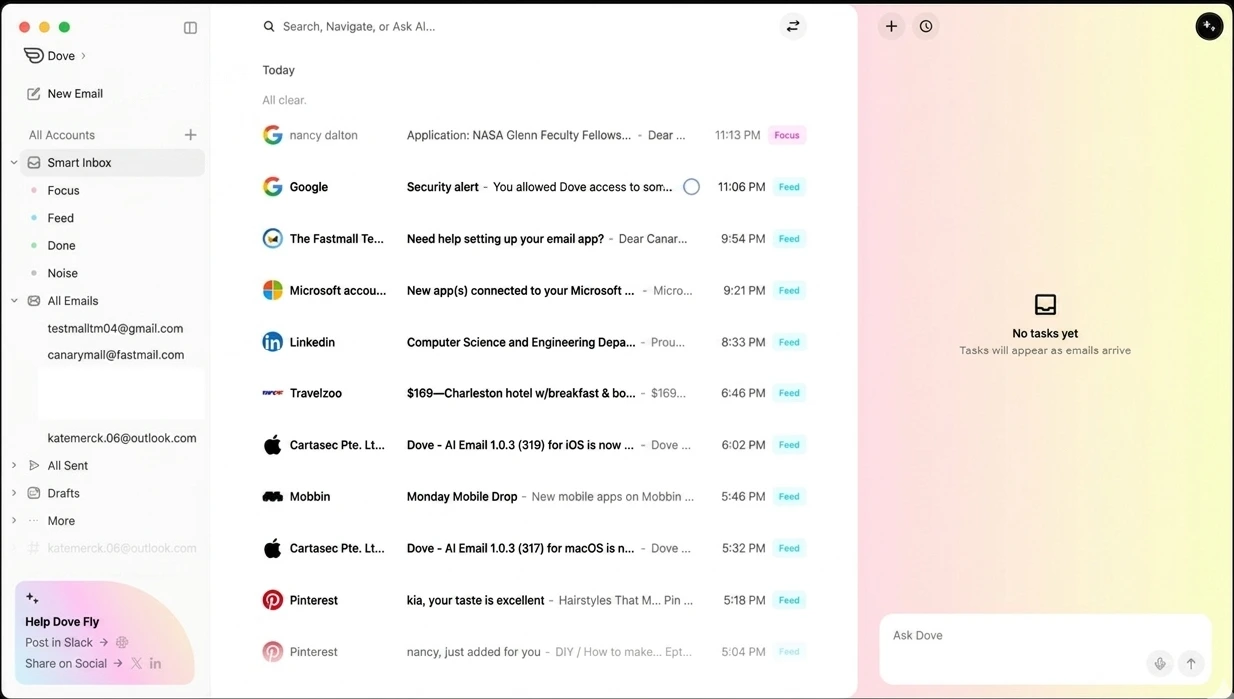
Dove is an inbox triage and workflow layer built for high-volume inbox automation. It sorts every message into one of four states: Focus, Feed, Noise, or Done.
- Focus is a real person, a real ask, a real deadline.
- Feed is newsletters, updates, and subscriptions - things worth reading when you have time, but never urgent.
- Noise is everything that doesn't need you - marketing, bulk mail, spam.
- Done is what you decide when you have handled something.
Two decisions made for you. One left to you. And a dedicated lane for the reading you actually want to do - just never mixed in with the things that need a response.
There is no middle bucket. No "maybe later" pile that quietly becomes another backlog. Dove classifies every email automatically and learns from what you do next. Focus improves quickly as Dove learns from your behavior.
Want to see how Dove works? Explore Dove
Why We Are Building Dove
Most people don't have an email problem. They have a volume problem dressed up as an email problem.
The inbox was not originally designed for the volume most professionals deal with today.
- Filters help - until you have too many to maintain.
- Priority Inbox helps - until it misses the thread that matters most.
- Folders help - until you cannot remember which folder you used.
Every solution adds more structure. More decisions. More things to maintain.
Dove takes the opposite approach. Instead of giving you better tools to organize, it gives you fewer decisions to make. The classification happens automatically from day one. No manual rules to write. No lengthy calibration period.
The problem Dove solves is not just organization. It is reducing the amount of attention email demands in the first place.
Who Dove Is For
- Founders and operators handling high email volume who need signal, not noise
- Freelancers and consultants managing multiple clients where nothing can slip
- Professionals who have tried every inbox system and still feel behind
- Power users who live in Gmail or Outlook but want intelligence layered on top
- Anyone who has missed an important email because it was buried under promotions and bulk mail
If your inbox is already under control, Dove probably is not the right fit. If it is not - and the system you are using to manage it has itself become work - Dove is worth a look.
How Dove Relates to Canary Mail
These are two separate products solving two different problems.
Canary Mail is the secure cross-platform email client. It is built for people who want privacy, security, and a clean native experience across Apple and other platforms. It includes optional AI features that can be enabled or disabled based on your preference. That product is not changing.
Dove is built for inbox automation and smart triage. It is for people whose primary problem is volume and attention management - who need the inbox itself to make decisions, not just display them.
Shared Inbox sits alongside both - a collaboration layer for teams managing shared email accounts.
Three products. Three distinct jobs. No overlap in what they're trying to do.
| Product | What it does | Who it's for |
|---|---|---|
| Canary Mail | Secure cross-platform email client with optional AI | Privacy-focused users, Apple platform users |
| Dove | Inbox triage and workflow layer - Focus, Feed, Noise, Done | High-volume users who need inbox decisions automated |
| Shared Inbox | Team collaboration on shared inboxes | Teams managing shared email accounts |
If you are a Canary Mail user wondering whether Dove replaces it - it does not. They solve different problems. You might end up using both. You might not. That is fine either way.
If your priority is privacy, security, and a clean cross-platform email experience, Canary Mail remains the better place to start. Dove becomes relevant when inbox volume itself becomes the problem.
Curious about Canary Mail? Explore Canary Mail features
When to Choose Canary Mail vs Dove
| Choose Canary Mail if... | Choose Dove if... |
|---|---|
| You want a secure cross-platform email client | Inbox volume is your main problem |
| Privacy and encryption are a priority | You need automated triage and prioritization |
| You want a native Apple-friendly experience | You want the inbox to classify what needs your attention |
| You want optional AI features you control | You want a product that makes inbox decisions for you |
Not sure which fits your situation? See everything Canary Mail does or explore Canary Mail for Mac.
[cta-block:ctablock4,title="Ready to try Canary Mail?",subtitle="Secure cross-platform email with optional AI - across Mac, iPhone, and more.",button1="Explore Features",button1link="/features",button2="Download Now",button2link="/downloads"]
What Makes Dove Different from Standard Inbox Filter Tools
Most inbox tools give you better ways to organize. Dove makes a clear classification decision - and a clean lane for everything else.
The classification is not rule-based. Dove tracks who you reply to, what you open, and what you ignore. The model gets sharper the more you use it, and it is already calibrated by the time setup is done.
A few things that separate it from standard inbox filter tools. Want to see the full feature list? Explore Dove features.
No Training Period
During onboarding, Dove analyzes your existing email patterns. By the time setup is complete, it already has a strong initial signal for what belongs in Focus, what is Feed, and what is Noise. Most tools require a long passive data period before they become useful. Dove is designed to reduce that gap significantly.
Wingman
Open a Focus email and Dove's Wingman feature automatically analyzes the full thread before you reply. It surfaces key details you might otherwise miss - changed terms, action items, or reply risks - before you hit send.
Daily Tasks
Dove scans Focus emails and builds a prioritized task list - grouped by project, ranked by urgency. When a new email changes a task, Dove updates it automatically.
Three categories keep it clean:
- Action Required - Do this now
- Follow Up - You are waiting on someone
- Upcoming - Deadlines approaching
Security Baked In
Every email gets a risk score. Dangerous emails are automatically quarantined to Noise. Suspicious ones are downgraded from Focus even if the sender looks legitimate. Focus stays clean and safe.
Dove is now available. Download it at dove.email/download
What Happens Next
Dove is now available to download. Head to dove.email/download and connect your existing email account.
It works with Gmail, Microsoft 365, and IMAP. No email migration required - it connects to your existing account and works across iOS, Android, macOS, Windows, and the web.
Ready to get started? Download Dove at dove.email/download. Pricing details are available at dove.email/pricing.
Explore the Product Family
- Canary Mail - secure cross-platform email client with optional AI
- Dove - inbox triage and workflow layer - dove.email
- Shared Inbox - team collaboration on shared email accounts
Frequently Asked Questions
What is Dove?
Dove is a workflow layer that automatically sorts every message into Focus, Feed, Noise, or Done. Focus is for emails that need you. Feed is for newsletters and updates. Noise is everything else. Done is yours to assign when you have handled it. It works with Gmail, Microsoft 365, and IMAP.
Is Dove part of Canary Mail?
Dove is made by the same team behind Canary Mail. It is a separate product with a separate focus - inbox triage and automation, rather than the secure cross-platform experience Canary Mail delivers.
Is Dove replacing Canary Mail?
No. Canary Mail continues as the secure cross-platform email client it has always been. Dove is a new product solving a different problem. They serve different needs and are built to coexist.
Who should use Dove?
Dove is built for people who get too much email and need the inbox itself to make decisions - founders, freelancers, executives, and anyone whose current inbox system has become work in itself.
What email providers does Dove support?
Dove works with Gmail, Microsoft 365 / Office 365 / Outlook, and any IMAP-compatible email provider. No migration required - it connects to your existing account.
How is Dove different from standard inbox filter tools?
Most inbox filter tools sort emails by rules you write. Dove classifies by content and behavior - who you reply to, what you open, what you ignore. It separates urgent emails (Focus) from reading material (Feed) from everything else, and it is already calibrated by the time setup is complete. No lengthy manual training. No rules to maintain.
How can I follow updates about Dove?
Dove is now available to download. Visit dove.email/download to get started. Pricing details are available at dove.email/pricing.
Is Dove available now?
Yes. Dove is now available. Download it at dove.email/download and connect your existing email account. Pricing details are available at dove.email/pricing.
The Bottom Line
Dove is a new product from the Canary Mail team. It does not replace anything that already exists. It solves a specific problem - the inbox that never gets to zero, the important email buried under promotions, the feeling that you are already behind before the day starts.
Four states - Focus, Feed, Noise, Done - and an inbox triage layer that makes the call so you do not have to.
If that is the problem you are dealing with, Dove is worth your time.
If a secure cross-platform email client is what you need instead, Canary Mail is the place to start.
[cta-block:ctablock4,title="Not sure where to start?",subtitle="Explore Canary Mail for secure cross-platform email or download Dove for inbox triage.",button1="Explore Canary Mail",button1link="/features",button2="Download Dove",button2link="https://dove.email/download?utm_source=canarymail&utm_medium=blog&utm_campaign=introducing_dove&utm_content=end_cta"]