Built for support and success teams that live in their inbox
- Unify all customer-facing inboxes in one shared view
- AI drafts replies and summarizes long threads
- Assign conversations and add internal comments with clarity
- Keep sensitive customer data safe and secure
Customers expect fast, accurate responses, but support and success teams often juggle multiple inboxes, channels, and internal tools. This shared inbox centralizes every email, surfaces priority conversations with AI, and ensures your team never misses a critical customer thread - all securely.
Who this shared inbox is for
This shared inbox is built for support and customer success teams that handle high-volume customer communication and need clear ownership, visibility, and accountability:
- Support agents managing incoming questions, issues, and escalations
- Customer success managers handling renewals, adoption, and at-risk accounts
- Team leads who need visibility into workload, response times, and customer priority
[cta-block:ctablock1,title="Start Free Trial for Support Teams",button="Try Canary Mail Free for Support Teams",buttonlink="https://canarymail.io/downloads"]
Why default email tools struggle with shared inboxes
Standard email clients treat every message the same. Support and customer success teams need to prioritize customer issues, renewals, and at-risk accounts first.
In a shared support inbox, some emails represent urgent customer problems, renewal risk, or adoption blockers. Others are routine questions or low-priority requests. When everything looks identical, critical conversations get delayed or missed.
Common problems support and success teams face with generic email tools
- No clear ownership
Multiple agents see the same message, with no one responsible. Customers get duplicate or missed replies. - Hidden internal conversations
Notes and context live in external chat apps. New agents opening the thread miss prior discussions. - Difficult handovers
Conversations move between support, success, and sales teams, splitting context across multiple tools. - No simple view of workload or backlog
Hard to see open tickets, overloaded agents, or waiting customers. - Limited structure for priorities and segments
VIP accounts, trial users, and free-tier inquiries all look identical.
Why teams need a different kind of inbox
Support and success teams need a shared inbox that organizes conversations, shows ownership, surfaces priority threads, and reduces friction - without forcing a complex ticketing system.
Managing customer queries as a team requires more than just a forwarded alias. It requires a centralized workspace where every message is tracked. If you are new to this workflow, you can read our deep dive on what is a shared inbox and how to set one up to see how it transforms team transparency.
What a shared inbox for support and customer success should include
Support and success teams don’t need extra email bells and whistles - they need a single tool that reduces manual work, ensures accountability, and keeps every customer interaction smooth and timely.
Features that matter for support and success teams
1. Shared inbox on top of real email accounts
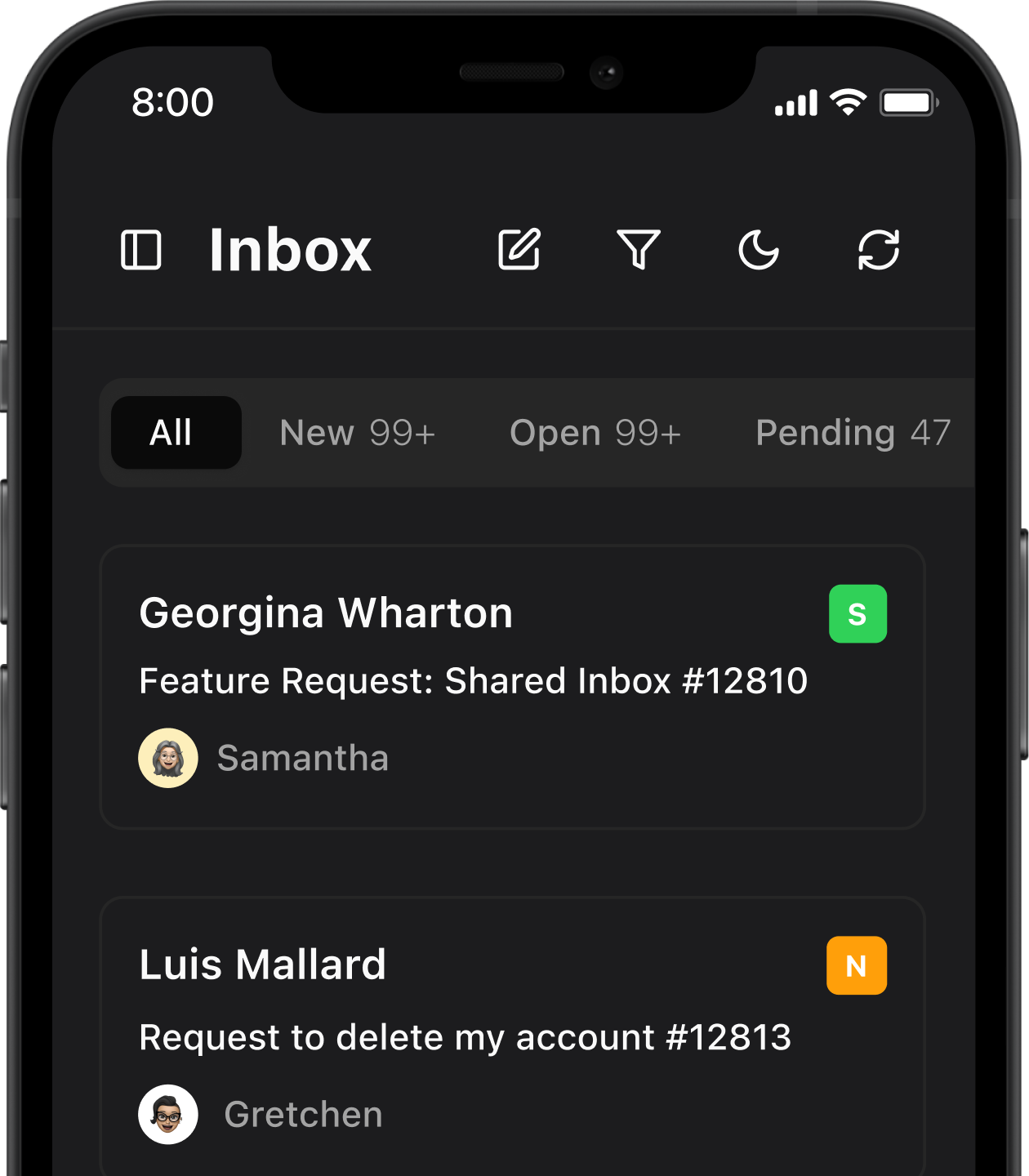
- Connect addresses like support@, help@, success@, and billing@
- Work together in a single shared inbox instead of separate personal inboxes
- Keep using your existing providers such as Gmail or Microsoft 365 while adding a better client on top
Outcome: Agents spend less time switching between inboxes and more time resolving customer inquiries efficiently.
2. Assignments and internal comments
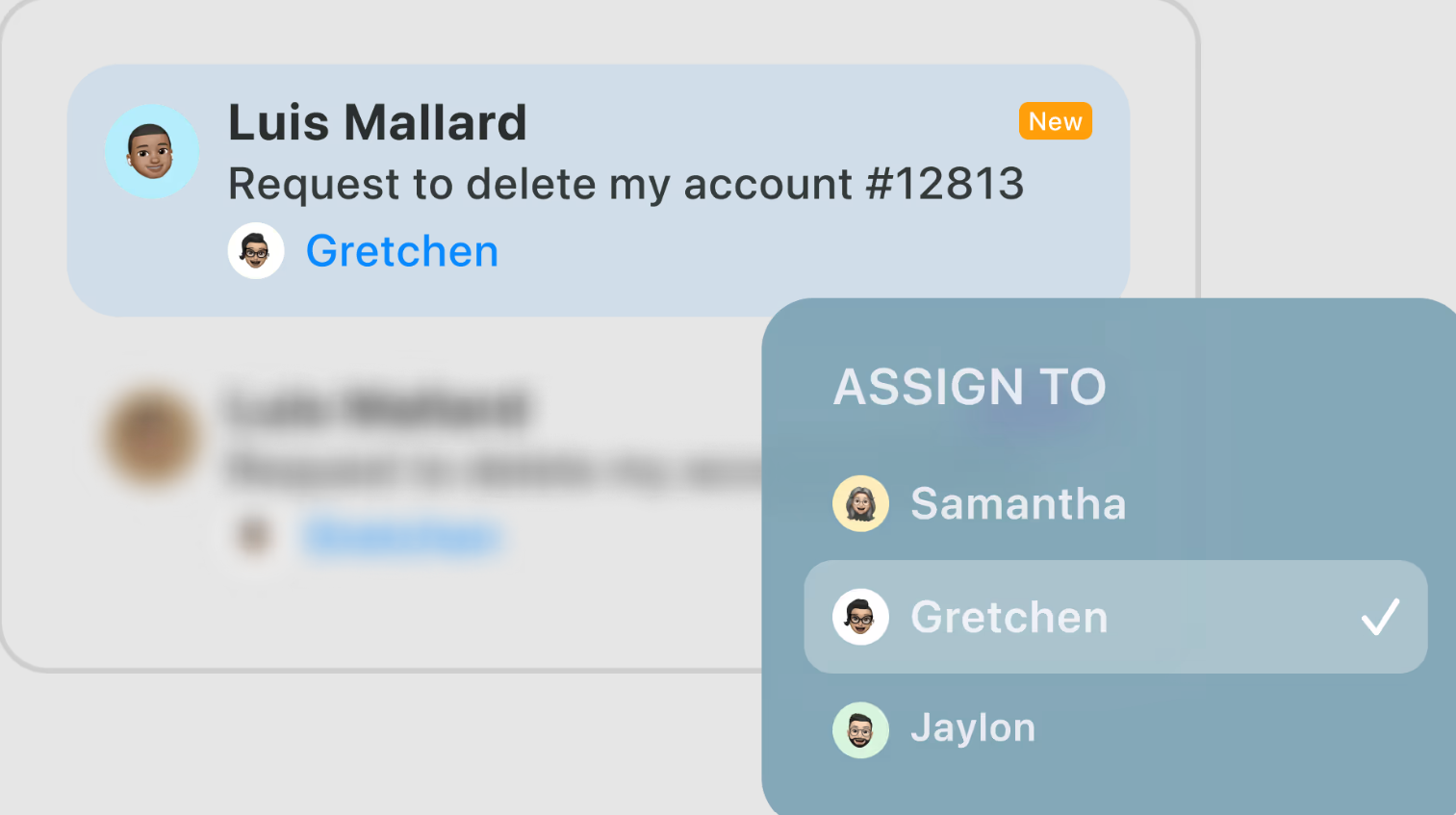
- Assign conversations to specific agents or success managers so ownership is always clear
- Add internal comments inside threads so context, notes, and decisions are visible to the whole team
- Avoid noisy forwards and external chat threads disconnected from the customer email
Outcome: Clear ownership prevents double replies, missed messages, and confusion across the team.
3. AI assistance for faster, consistent replies
- Draft replies based on templates or past interactions
- Summarize long threads so new agents or success managers can catch up quickly
- Adjust tone to match your brand voice while keeping messages human and professional
Outcome: Faster, consistent, and accurate responses without losing the personal touch.
4. Views for priorities, statuses, and segments
- Tag conversations as new, in progress, waiting for customer, waiting for internal input, or resolved
- Create saved views for priority customers, high-value accounts, or specific products
- Help leads see which customers need attention right now
Outcome: Agents focus on what matters most, improving response times and customer satisfaction.
5. Security and privacy for customer data
- Encrypted connections to your mail providers
- Tracker blocking to reduce unwanted external tracking
- Options for end-to-end encryption and SecureSend when handling sensitive information
Outcome: Customer data stays protected while enabling fast, reliable, and compliant responses.
Shared inbox workflows that match real customer journeys
Support and success teams live in their inbox. A shared inbox should mirror how work actually happens - keeping every team member aligned, ensuring timely responses, and making collaboration seamless.
1. New customer questions in support@
- All new questions arrive in the shared support@ inbox
- A dispatcher or rotation assigns each conversation to the right agent
- Agents use AI-drafted replies as a starting point, then customize them for each customer
- When the issue is resolved, the conversation is marked as complete
Outcome: Every new inquiry is handled efficiently, consistently, and with full visibility for the team.
2. Escalation from support to customer success
- Support identifies questions that are about adoption, product fit, or require deeper attention
- The conversation is reassigned to customer success with internal comments explaining the context
- Success continues in the same thread, visible to both teams
- If needed, success loops in sales or product using internal comments instead of forwarding emails
Outcome: Escalations are seamless, context is preserved, and customers experience smooth handoffs between teams.
3. Handling renewals and at-risk customers
- Conversations from renewal@ or billing@ appear in dedicated views
- Success managers tag at-risk customers and create follow-up reminders
- AI summaries help quickly review past interactions before calling or writing
- Notes and decisions stay in the thread for future reference
Outcome: Renewals and retention are handled proactively, reducing missed opportunities and keeping customers engaged.
4. Collaboration between support, success, and product
- When a bug or feature request comes in, support adds an internal note and tags product
- Product can see the full customer thread for context
- Once there is an update, product shares it in the same conversation so support and success can respond to the customer
Outcome: Everyone stays on the same page, miscommunication is minimized, and collaboration across teams is smooth. For sales-related conversations, see the Email App for Sales and Account Managers.
Why these workflows work
These inbox-first workflows help support and customer success teams:
- Handle customer inquiries consistently and efficiently
- Reduce missed messages and duplicated responses
- Keep communication coordinated and auditable across the team
- Maintain focus on high-priority customers and at-risk accounts
All without switching between multiple tools
Canary helped our team respond faster, resolve customer issues efficiently, and never lose context between support, success, and product teams.
-Head of Customer Success
[cta-block:ctablock1,title="Turn these workflows into your daily support routine",button="Set up Canary Mail for Your Team",buttonlink="https://canarymail.io/downloads"]
Pricing that fits growing support and success teams
A shared inbox solution for support and success should:
- Small teams can start on free or trial plans
- Team plans add shared inboxes, assignments, internal comments, and AI
- Scale easily as customer base grows
You can always see the most current structure on the pricing page.
Quick start for support teams (5 simple steps)
- Install Canary Mail on team devices
Download the app on the devices used by your support and customer success team and sign in. - Connect shared addresses
Add shared inboxes such as support@, help@, success@, and billing@ while keeping your existing email provider. - Define support statuses
Create tags for workflows like new, in progress, waiting for customer, and resolved so every conversation is easy to track. - Set up assignments and internal comments
Assign conversations to the right agent or success manager and add internal notes that stay visible to the team but hidden from customers. - Enable AI drafts and summaries
Turn on AI-assisted reply drafts and thread summaries to help agents respond faster and catch up on long conversations. - Run alongside your current setup
Use Canary Mail alongside your existing tools for a short period, then switch fully once the team is comfortable.
Built to grow with your team
Whether managing one shared inbox or multiple accounts, Canary Mail scales as your team and customer load grow.
[cta-block:ctablock3,title="Boost Your Support Productivity",subtitle="Manage customer conversations, assignments, and follow-ups efficiently with Canary",button1="Get Started Free for Support Teams",button1link="https://canarymail.io/pricing",button2="Explore all features",button2link="https://canarymail.io/features"]
Shared inbox for support and customer success - FAQ
Do we need to change our email provider to use a shared inbox?
No. You can continue using Gmail, Microsoft 365, or other providers. The shared inbox works on top of your existing email accounts and focuses on how your team collaborates - not on replacing your email host.
Can we see who is replying to each customer?
Yes. Assignments and activity history make it clear who owns each conversation and who replied last. This keeps accountability high and prevents duplicate or missed replies.
How does AI improve support and customer success replies?
AI helps draft reply suggestions and summarize long threads so agents and success managers can respond faster and stay aligned. Every message is reviewed and edited by your team before sending to ensure accuracy and brand consistency.
Is this suitable for teams that already use a helpdesk tool?
Some teams use the shared inbox for higher-touch, relationship-driven conversations while continuing to use a helpdesk for tickets. Others replace simple helpdesk setups when they want to stay closer to email.
Is customer data safe in a shared inbox?
The app uses encrypted connections, blocks common tracking pixels, and offers options like end-to-end encryption and SecureSend for sensitive messages. You should still follow your internal data policies, but the shared inbox is designed with security as a priority.