Built for freelancers managing multiple clients and projects
- See all client emails in one place, without mixing projects or accounts
- Let AI summarize long feedback threads and help draft clear client replies
- Track approvals, revision requests, and overdue payments automatically
- Protect client files, credentials, and contracts with secure email features
For freelancers, email is where most client work happens. Briefs, revision feedback, invoices, payment confirmations, and access details arrive across personal, business, and client-specific inboxes.
You constantly switch between clients, track who owes feedback or payment, and try to keep projects moving without being online all day. This email app is designed for freelance workflows, bringing all client inboxes into one view, using AI to reduce reading and writing time, and helping you stay on top of follow-ups without mental overload.
Who this email app is for
This email app is built for freelancers who manage multiple clients, projects, and conversations every day.
- Freelancers juggling several client inboxes and ongoing projects
- Independent professionals tracking feedback, approvals, and payments
- Consultants and creatives who need clear boundaries between clients and personal email
[cta-block:ctablock1,title="Boost Your Freelance Workflow",button="Try Canary Mail Free for Freelancers",buttonlink="https://canarymail.io/downloads"]
Why default email clients fail freelancers with multiple clients
Standard email apps assume one primary job and one main inbox. Freelance work is different. You manage multiple clients, projects, and timelines at the same time.
Common problems freelancers face with generic email tools
- Client conversations scattered across inboxes
Messages arrive in personal accounts, business addresses, and platform notifications. There is no single place to see everything that needs attention. - Important project emails buried in noise
Client feedback and approvals sit next to receipts, newsletters, and personal messages, making it easy to miss something critical. - Manual follow-up tracking
Approvals, assets, and payments are tracked in your head, notes, or spreadsheets. When work gets busy, follow-ups are easy to forget. - No clear end-of-day visibility
It’s hard to know what is still open for each client, leading to late-night inbox checks and constant context switching. - Weak privacy controls for client data
Contracts, credentials, and sensitive documents are handled in the same inbox as casual emails, increasing risk.
A dedicated email app for freelancers with multiple clients is designed around client relationships, follow-through, and predictable workdays.
Why freelancers need a different kind of email app
Freelancers need an email app that keeps client projects organized, tracks deadlines, and reminds them of follow-ups - not just send and receive emails.
What a good email app for freelance work should include
Freelancers don’t need more email features. They need an email app that reduces mental load, protects follow-ups, and keeps client work clearly separated.
Features that matter for freelancers
1. Unified inbox across all client accounts
As an email app for freelancers, Canary Mail brings personal, business, and custom domain addresses into one place.
- Connect all client-facing inboxes
- Filter by client, domain, or project
- See recent activity across all accounts at a glance
Outcome: Less inbox switching and fewer missed client messages.
2. AI assistance for replies and summaries
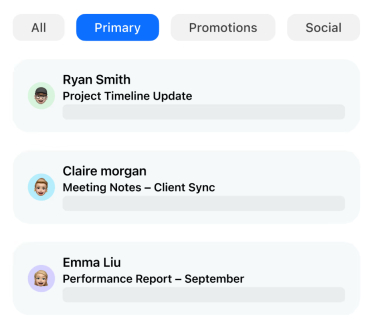
Freelance inboxes are full of repetitive questions and long feedback threads.
- Generate draft replies for status updates, confirmations, and simple questions
- Summarize long feedback or change-request threads before starting work
- Adjust tone so messages stay personal and client-appropriate
Outcome: Faster replies without losing your voice.
3. Simple tagging by client and project
You need structure without admin work.
- Tag conversations by client and project
- Create saved views for each active client
- Review what is open for each client at the end of the day
Outcome: Clear visibility into workload and priorities.
4. Reliable follow-up reminders for approvals and payments
Follow-ups are where freelance work often stalls.
- Turn any email into a follow-up reminder
- Set rules like “if no reply in X days”
- Use a focused “waiting for client” view
Outcome: Fewer forgotten approvals and faster payments.
5. Privacy and security for client communication
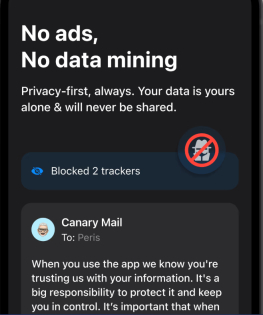
Client inboxes often contain sensitive information.
- Encrypted connections to email providers
- Tracker blocking to protect privacy
- Extra protection for sensitive attachments or credentials
Outcome: Professional, secure client communication without extra tools.
Email workflows that match real freelance work
A good email app for freelancers supports how work actually happens, from morning planning to end-of-day shutdown.
1. Morning triage across all clients
- Open the unified inbox to see everything new
- Scan AI summaries of long feedback threads
- Tag messages by client and project
- Snooze lower-priority items
Result: You start the day focused on what matters most.
2. Managing feedback and revision loops
- Keep all feedback for a project in one thread
- Review AI summaries before starting revisions
- Send clear confirmation replies using draft assistance
- Separate approved work from open revisions
Result: Fewer misunderstandings and smoother revisions.
3. Following up on invoices and payments
- Tag invoice-related conversations by client
- Set follow-up reminders for overdue payments
- Keep payment discussions separate from creative work
Result: More predictable cash flow without awkward reminders.
4. Protecting personal time and inbox boundaries as freelancer
- Keep work and personal accounts in one app but separate views
- Review open threads per client at the end of the day
- Close work views when you are done
Result: Work stays organized without bleeding into personal time.
For freelancers who also coordinate talent or hiring, see the email app for recruiters and HR teams guide.
Why these workflows work
These inbox-first workflows help freelancers:
- Stay on top of client projects consistently
- Never miss important follow-ups or deadlines
- Keep communication organized and easy to track
- Focus on high-value work and client relationships
All without juggling multiple apps.
Canary helped me stay on top of all my clients and deadlines effortlessly.
- Freelance Designer
[cta-block:ctablock1,title="Turn these workflows into your daily support routine",button="Set up Canary Mail for Your Freelance Inbox",buttonlink="https://canarymail.io/downloads"]
Pricing that fits solo freelancers and growing studios
An email app for freelancers with multiple clients should make it easy to start solo and scale naturally.
- Start on a free or trial plan
- Upgrade for advanced AI, security, and more devices
- Add shared inboxes as you grow into a small studio
For current plans, see the pricing page.
Quick start for freelancers (5 steps)
A simple setup path:
- Install Canary Mail on your main laptop and phone
Download the app from the downloads page and sign in. - Connect your client and personal inboxes
Add Gmail, Outlook, Exchange, or any other accounts you use for client communication and personal projects. - Organize clients and projects
Create tags or folders for each client and key projects so important emails always surface first. - Enable AI summaries and draft replies
Turn on AI features to summarize long threads, suggest replies, and save time on routine communication. - Set up follow-up reminders
Schedule notifications for deadlines, approvals, invoices, and payments so nothing slips through the cracks.
You can run Canary Mail alongside your existing setup before switching fully.
Built to grow with your freelance business
For freelancers, flexible inbox management and client organization features make it easy to handle multiple clients, projects, and collaborators without slowing down your workflow.
Whether managing one client or a dozen projects, Canary Mail grows as your freelance business and workload grow.
[cta-block:ctablock3,title="Manage Your Freelance Inbox Smarter",subtitle="Stay on top of clients, projects, and deadlines, all from one place..",button1="Get Started Free",button1link="https://canarymail.io/downloads",button2="Explore all features",button2link="https://canarymail.io/features"]
Email app for freelancers with multiple clients - FAQ
Do I need to change my email addresses to use this app?
No. You keep your existing personal, business, and custom domain addresses. The app connects to them and helps you manage everything in one place.
Will this help if most client updates come from tools or platforms?
Yes. As long as key updates reach your email, you can organize notifications, briefs, and approvals by client and project.
How does AI help without making messages sound generic?
AI provides draft suggestions and summaries. You review and edit every message, adjusting tone and context so communication stays personal.
Is my client data safe?
The app uses encrypted connections, tracker blocking, and options like end-to-end encryption and SecureSend. Access and sharing remain under your control.
Can this scale if I grow into a small agency or studio?
Yes. You can add more accounts and shared inboxes as you grow, without changing tools.