Built for founders and startup teams who live in their inbox
Founders manage everything from one place: investor updates, customer feedback, partnerships, hiring, and internal decisions. Missing the wrong email can slow momentum or cost trust.
This email app for founders and startup teams:
- Unifies all work accounts into a single inbox
- Uses an AI copilot to draft replies and summarize long threads
- Supports shared inboxes for founders@, support@, and partnerships@
- Protects sensitive startup conversations with strong privacy and encryption
Email becomes a control center for your startup, not a source of stress.
Who this email app is for
This email app is built for founders and early teams handling high-impact conversations every day.
- Startup founders juggling investors, customers, and internal communication
- Early-stage teams sharing inboxes and responsibilities
- Founders preparing for fundraising, growth, or scale
[cta-block:ctablock1,title="Get Started Free for Startup Teams",button="Try Canary Mail Free for Startups",buttonlink="https://canarymail.io/downloads"]
Why default email clients fail founders and startup teams
Standard email apps assume one role and predictable workflows. Startup life is the opposite.
In a founder’s inbox, some emails represent funding, revenue, or product decisions. Others are noise. When everything looks the same, critical threads slip through.
Common problems founders face with generic email tools
- Too many roles in one inbox
You switch constantly between CEO, salesperson, recruiter, and support. There is no clear separation. - Important threads buried by noise
Investor notes and key customer emails sit next to newsletters and automated notifications. - Manual follow-up tracking
Intros, deals, and investor questions rely on memory or scattered notes. - Weak support for collaboration
Forwarding emails or CC’ing everyone creates confusion and lost context. - Security as an afterthought
Sensitive conversations about runway, pricing, and strategy aren’t protected by default.
Founders need an email app designed for speed, clarity, and trust.
Why founders and startup teams need a different kind of email app
Founders need an email app that keeps investor, customer, and team conversations organized, surfaces priorities, and ensures follow-ups don’t slip - not just a place to send and receive emails.
What a good email app for founders should include
Email features built for startup teams
1. Unified inbox across founder and team accounts
Bring personal, company, and shared addresses into one view.
- Connect Gmail, Microsoft 365, iCloud, and custom domains
- Filter by account, label, or domain when needed
- See everything happening across the company at a glance
Outcome: Less context switching and fewer missed conversations.
2. AI copilot for replies and summaries
Founders do not have time to reread long threads.
- Generate draft replies from short bullet points
- Summarize long investor, customer, or team threads instantly
- Surface priority messages from investors and key customers
Outcome: Faster replies with full context.
3. Shared inboxes for founders, customers, and partners
Startups run on shared responsibility.
- Use shared inboxes like founders@, support@, partnerships@
- Assign messages and track status clearly
- Add internal comments without cluttering external threads
Outcome: Clear ownership and smoother collaboration.
4. Snooze and follow-up reminders for deals and intros
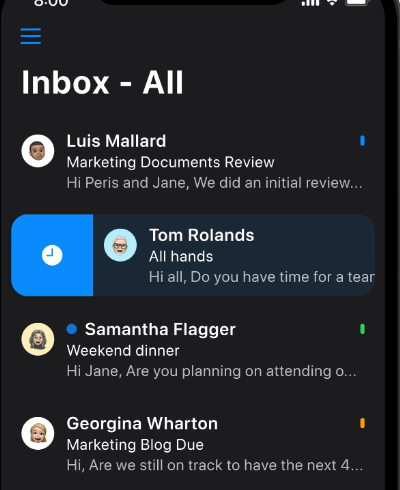
Momentum matters in early-stage companies.
- Snooze non-urgent messages to the right moment
- Set follow-up reminders for investor intros and deals
- Review a focused “waiting for reply” view
Outcome: Nothing important stalls silently.
5. Privacy and security for sensitive startup communication
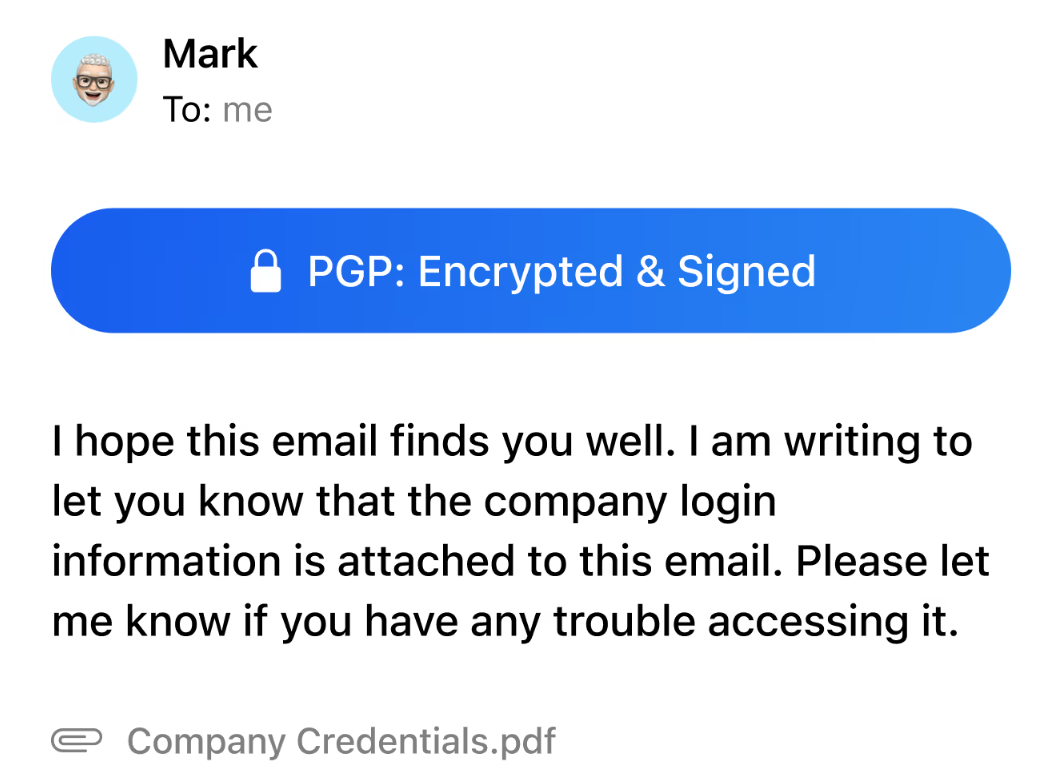
Early-stage conversations require trust.
- Encrypted connections by default
- Optional end-to-end encryption and PGP
- Tracker blocking to reduce unwanted monitoring
Outcome: Professional, privacy-first communication from day one.
Email workflows that match real startup life
Startup email isn’t about reaching inbox zero. It’s about knowing what matters right now and acting on it quickly. These workflows show how founders and early teams use Canary Mail to stay organized, follow up consistently, and protect focus.
1. Morning overview for founders
- Start the day in a unified inbox that shows everything new across accounts.
- Scan AI summaries to understand long threads with investors, customers, and teammates in seconds.
- Tag conversations by fundraising, product, hiring, or operations so priorities are clear.
- Snooze non-urgent messages to keep focus on what actually needs action.
Result: A clear view of priorities without inbox overload.
2. Handling investor communication
- Keep investor emails organized with consistent tags and threads.
- Review AI summaries before calls to stay aligned on context and next steps.
- Set reminders for follow-ups, deliverables, and deadlines so nothing slips.
- Use encryption and tracker blocking when sharing sensitive updates or documents.
Result: Confident, consistent investor communication with less manual effort.
3. Routing customer and partner emails
- Use shared inboxes like support@ or hello@ to centralize incoming messages.
- Assign conversations to the right teammate based on product, sales, or partnerships.
- Add internal notes to preserve context and decisions as the team grows.
- For a deeper dive into team workflows, see the guide on the shared inbox for support and customer success.
Result: Faster responses and fewer dropped or duplicated conversations.
4. Protecting focus and maker time
- Close the inbox during deep work or build time.
- Catch up quickly using AI summaries instead of rereading entire threads.
- Turn important emails into reminders or snoozed tasks rather than constant interruptions.
Result: More focus for building, without losing visibility into what matters.
Why these workflows work
These inbox-first workflows help founders and startup teams:
- Keep critical conversations moving across investors, customers, and partners
- Reduce missed follow-ups and dropped threads
- Stay aligned as a small team without constant check-ins
- Protect focus while staying responsive to what matters
All without switching between multiple tools.
Canary helped us stay on top of investor updates and customer conversations without living in our inbox.
- Founder, [Startup]
[cta-block:ctablock1,title="Turn these workflows into your daily support routine",button="Set up Canary Mail for Your Team",buttonlink="https://canarymail.io/downloads"]
Pricing that fits early-stage startups
An email app for founders should scale naturally.
- Start free or on a trial with founder accounts
- Upgrade for advanced AI, shared inboxes, and more devices
- Add team access as you hire
For full details, see the pricing page.
Quick start for founders and startup teams
Getting set up takes minutes - not weeks of setup or migration.
- Install Canary Mail on founder and team devicesDownload the app from the downloads page and sign in on laptops and phones used by the founding team.
- Connect your work email accountsAdd personal work inboxes, company domain emails, and key shared addresses like founders@ or hello@.
- Mark VIP sendersFlag investors, advisors, key customers, and partners so important conversations always stay visible.
- Turn on founder-critical viewsEnable unified inbox, AI summaries, and reply drafts. Create tags for fundraising, product, hiring, and operations to keep work clearly separated.
- Set up shared inbox workflows (if needed)Create shared inboxes such as support@ or founders@, assign ownership, and use internal notes to keep decisions and context in one place.
If you also operate at executive level in a larger organization, you may want to read the guide on the inbox zero email app for busy executives.
Built to grow from solo founder to full startup team
For founders and early teams, flexible pricing and shared inboxes make it easy to add co-founders, early hires, and collaborators without disrupting workflows or involving complex IT setup.
Whether you’re managing one personal inbox or multiple shared addresses, Canary Mail scales smoothly as your company and communication needs grow.
[cta-block:ctablock3,title="Move Faster Without Losing Important Conversations",subtitle="Manage startup communication, follow-ups, and shared inboxes efficiently with Canary.",button1="Get Started Free",button1link="https://canarymail.io/downloads",button2="Explore all features",button2link="https://canarymail.io/features"]
Email app for founders and startup teams - FAQ
Do we need to change our email provider to use this email app?
No. You keep using Gmail, Microsoft 365, iCloud, or your custom domain. The app connects to your existing accounts and improves how founders and teams read and organize email - it does not replace or host your email provider.
Can multiple founders and early hires work from the same inbox?
Yes. Shared inboxes allow founders and early team members to collaborate in addresses like founders@, support@, or partnerships@. Messages can be assigned, ownership is always clear, and internal comments keep coordination private and organized.
How does AI help founders without making messages sound generic?
AI supports founders with draft suggestions and thread summaries - not automated sending. You review and edit every message, adjust tone, and add context before sending. This speeds up routine communication while keeping your voice personal and authentic.
Is this safe for sensitive startup and investor information?
Yes. The app uses encrypted connections by default and offers additional options like end-to-end encryption and PGP for sensitive conversations. Tracker blocking helps reduce unwanted monitoring, while access remains fully under your control.
Will this replace our project management or CRM tools?
No. This email app focuses on day-to-day communication and follow-ups. Project management tools, issue trackers, and CRMs continue to handle structured workflows and data. Canary Mail helps founders move smoothly between email and those tools without losing context.