Disclosure: this is a review of our own app, written by the team that makes Canary Mail. We can't be neutral about it, so we've stuck to what the app and its plans actually include, listed the downsides we'd want to know about, and linked independent ratings so you can check us. Prices were checked on our pricing page on October 16, 2026.
Short answer: Canary Mail is a good pick if you want one app for several email accounts on Mac, iPhone, iPad, Windows and Android, with AI writing, read receipts and PGP encryption available when you want them. The free plan is generous for accounts but limited to two devices, and the features most people come for need a paid plan: Growth at $36 a year or Pro+ at $100 a year, with no monthly option. It's rated 4.5 on the US App Store (8.8K ratings) and 4.3 on Google Play (7.7K reviews).
Canary Mail at a glance
| Canary Mail | |
|---|---|
| What it is | An email app (client) for your existing accounts, not an email provider |
| Platforms | Mac, iPhone, iPad, Windows, Android |
| Accounts | Gmail, Outlook, iCloud, Yahoo, Exchange, any IMAP |
| Free plan | Unlimited accounts on 2 devices, AI inbox sorting, basic read receipts, snooze, templates |
| Growth | $36/year or $100 once: AI writing and summaries, read receipts, send later, calendar, 5 devices |
| Pro+ | $100/year or $300 once: adds PGP, SecureSend, phishing and impersonation detection |
| Trial | 7 days of every paid feature, no credit card |
| Ratings | App Store (US) 4.5 from 8.8K ratings; Google Play 4.3 from 7.7K reviews |
| Users | 2M+; featured by Apple on the App Store and Mac App Store |
What Canary Mail is
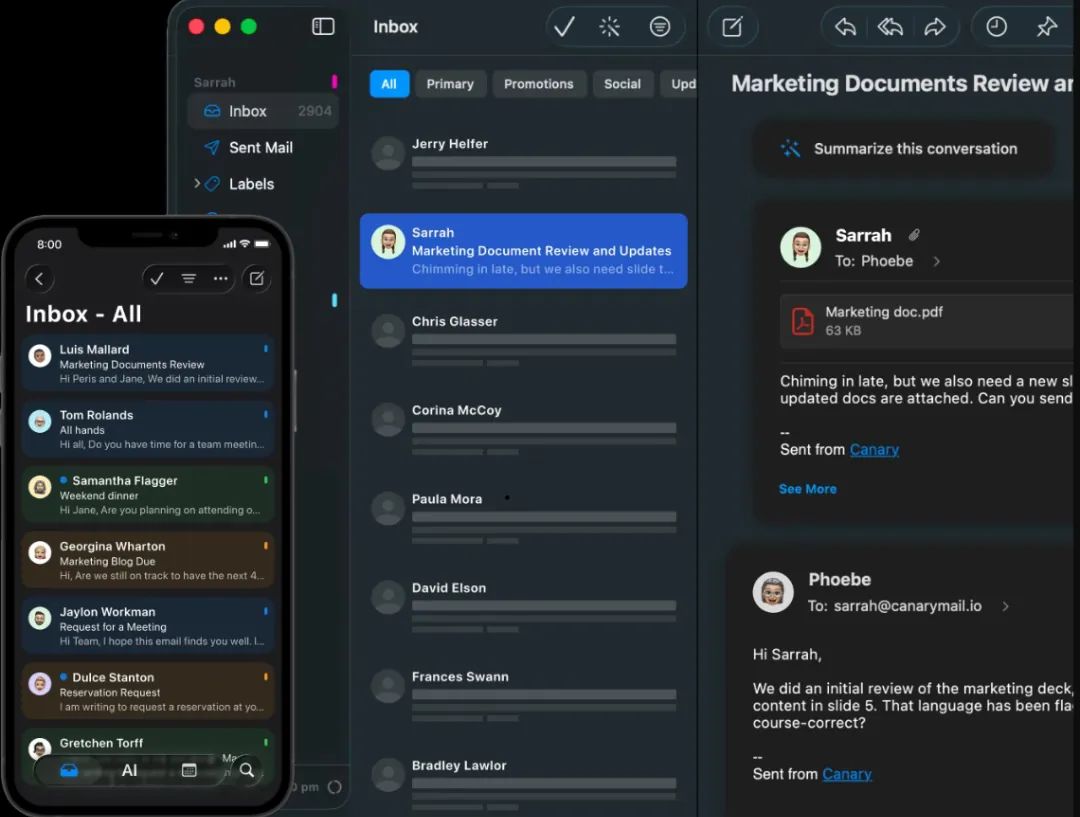
Canary Mail is an email client. You add the accounts you already have (Gmail, Outlook, iCloud, Yahoo, Exchange or any IMAP account) and read them in one unified inbox. Your mail stays with your provider; Canary syncs it to your devices. It doesn't give you a new address or host a domain, so if you want to leave Gmail or Outlook as a service, you need a provider, not Canary.
Canary has more than 2 million users, and Apple has featured it on both the App Store and the Mac App Store. One licence covers every platform.
AI features
Every plan, including free, sorts incoming mail with AI, and that triage runs on your device. The Growth plan adds AI that drafts replies, rewrites what you've written and summarizes long threads. It works the same on every account you add, which is the main difference from Gemini in Gmail or Apple Intelligence in Apple Mail.
You can turn the AI features off, and your email isn't used to train AI models.
Our honest take: if all you want is a quick summary or a polished reply on a single Gmail account, Gemini's free tier in the US or Apple Intelligence on a recent iPhone or Mac may be enough. Canary's AI is worth paying for when you use several accounts or providers. Our best AI email assistants guide compares the options.
Privacy and security
Tracker blocking is on by default, so senders' tracking pixels don't report when you open their mail. Canary's privacy policy says it doesn't extract data from your email for tracking or advertising.
Pro+ adds PGP for end-to-end encrypted mail with people who use PGP, SecureSend for sending encrypted messages and attachments to people who don't, and phishing and impersonation detection. See PGP vs SecureSend for how the two differ.
Everyday features
The free plan already includes the unified inbox, snooze and pinned emails, templates, one-click unsubscribe and basic read receipts. Growth adds full read receipts, send later and a built-in calendar. The calendar is complete on Mac, iPhone and iPad, works only with Gmail on Windows, and isn't available on Android yet.
Performance on large mailboxes
Canary builds a local index of your mail so search and AI work quickly. The flip side is the first sync: our own help centre says that with large Gmail or Outlook archives, setup, search and sync can take longer at first while the index is built, and AI summaries can load slowly until it finishes. If you're testing Canary on a mailbox with years of mail, give it time to finish indexing before you judge search.
Pricing
Canary has three plans. Free costs nothing and covers unlimited accounts on two devices. Growth is $36 a year, or $100 once for a lifetime licence. Pro+ is $100 a year, or $300 once. Paid plans cover five devices across all platforms. There is no monthly billing; the $3 and $10 a month figures you may see are the yearly price divided by twelve.
When you install the app you get every paid feature for 7 days without a credit card, and if you don't upgrade you move to the free plan automatically. For teams that share inboxes, our separate product, Shared Inbox by Canary, starts at $10 per user per month with a 14-day trial.
Pros and cons
What we think Canary does well:
- Unlimited accounts on the free plan, in one inbox on five platforms.
- AI writing and summaries that work on every account, not one provider.
- PGP and SecureSend built in, without switching provider.
- Read receipts on any account, including personal Gmail.
- Tracker blocking on by default, triage on device, and no AI training on your email.
The downsides:
- No monthly plan. You pay yearly or once, which is a bigger upfront cost if you just want to try it for a few months after the trial.
- The free plan stops at two devices. A phone, a laptop and a work PC means paying.
- AI writing, full read receipts, send later and the calendar all need Growth. Free alternatives like Apple Mail now do some of this at no cost on supported devices.
- Encryption costs $100 a year. If PGP is all you need, Thunderbird does it for free, at the cost of AI and polish.
- The calendar is uneven across platforms: Gmail-only on Windows and not on Android.
- Big mailboxes take a while to index on first setup.
- It's for individuals. Shared inboxes and team assignment live in a separate product.
Independent ratings
On October 16, 2026 the iPhone and iPad app had a 4.5 rating from 8.8K ratings on the US App Store, and the Android app had 4.3 from 7.7K reviews and 100K+ downloads on Google Play. The US Mac App Store doesn't show an overall rating for the Mac app because too few ratings were left there. Read the recent reviews in both stores, good and bad; they're the best check on anything we say here.
Who Canary Mail is for
- A good fit if you manage several accounts across providers, use more than one platform, want AI writing or read receipts on any account, or need encrypted email without switching provider.
- Not the best fit if you only use Apple devices and Apple Mail does what you need, want a fully free app on many devices, need a new email address or hosting, or want shared team inboxes.
Comparing? See Canary Mail vs Apple Mail, Canary Mail vs Gmail, Canary Mail vs Spark, Canary Mail vs Superhuman and Canary Mail vs Thunderbird.
Verdict
Canary Mail is at its best for people with several accounts across providers and devices who want AI, read receipts or encryption in one app, at $36 or $100 a year. If you're happy with one account in Gmail or Apple Mail and their built-in AI, you may not need it. The 7-day trial is the easiest way to find out.
Frequently asked questions
How much does Canary Mail cost?
Canary has a free plan. Growth is $36 a year and Pro+ is $100 a year, or $100 and $300 as one-time lifetime purchases. There's no monthly plan.
Can I use Canary Mail for free?
Yes. The free plan covers unlimited accounts on two devices, with AI inbox sorting, basic read receipts, snooze and templates. You also get a 7-day trial of every paid feature with no credit card.
Is Canary Mail safe?
Canary blocks trackers by default, runs inbox triage on your device and doesn't use your email to train AI. Pro+ adds PGP, SecureSend and phishing and impersonation detection.
Is Canary Mail an email provider?
No. It's an email app for accounts you already have with Gmail, Outlook, iCloud, Yahoo, Exchange or any IMAP provider. Your mail stays with your provider.
Is there a better mail app than Apple Mail?
It depends on what you need. Apple Mail is free and now has Apple Intelligence on recent devices. Apps like Canary add read receipts, PGP, Windows and Android apps, and AI on any device. See our guide to the best email clients for Mac.
What devices does Canary Mail run on?
Mac, iPhone, iPad, Windows and Android. Free covers two devices; Growth and Pro+ cover five.